Sometimes an occasion will require an instructor finding a student's last activity in a course.
To view student activity:
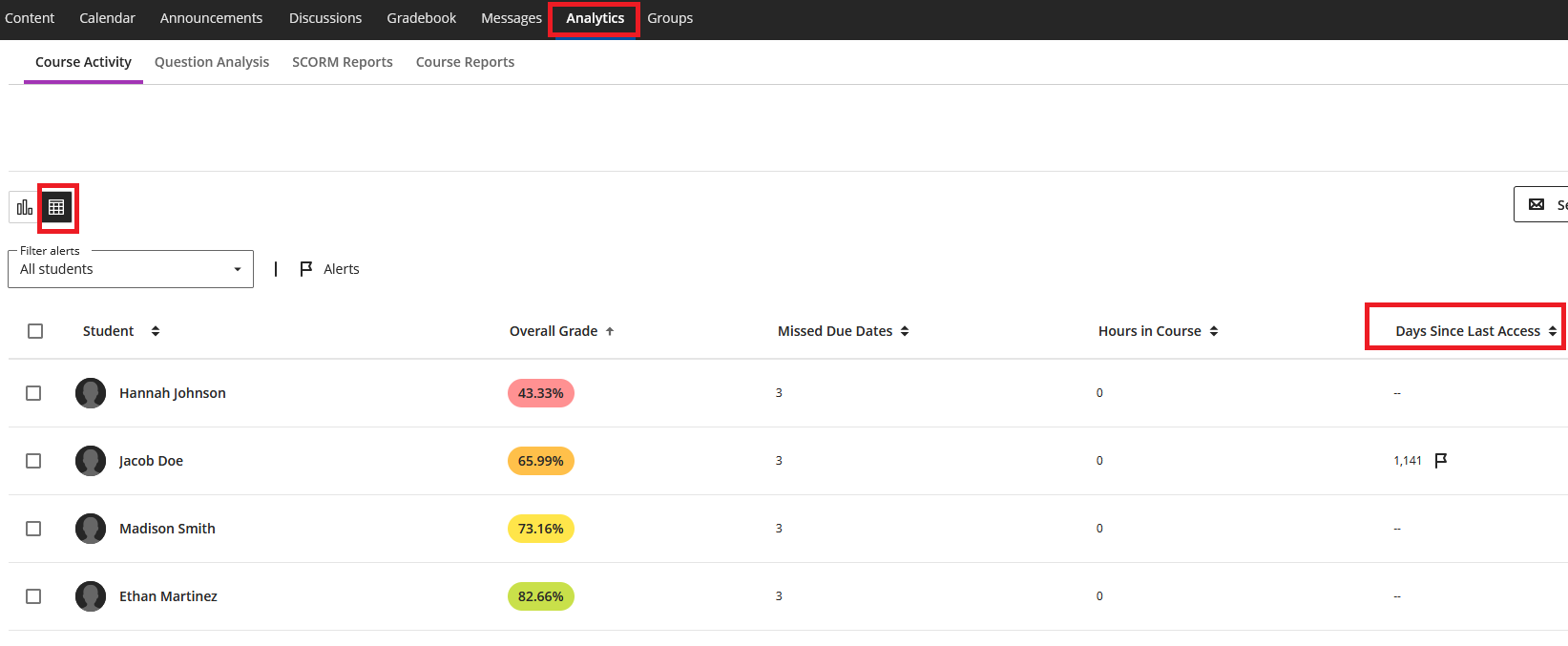
- Click the Analytics tab.
- Make sure you are in Grid View.
- Locate Days Since Last Access.
- Click the arrow to the right of the column header Days Since Last Access to sort the column, and quickly identify students who have not logged in recently.
For more detailed information, click on the student's name from either the Analytics view or the Grid View of the Gradebook. You can access detailed Information about the student's activity in the course by clicking on Student Activity. This view shows the student's most recent access date and the amount of time they have spent in the course. 
You can also obtain each student's last activity date by going to Gradebook Settings and downloading the Gradebook.
Was this article helpful?
That’s Great!
Thank you for your feedback
Sorry! We couldn't be helpful
Thank you for your feedback
Feedback sent
We appreciate your effort and will try to fix the article