In Blackboard, you are able to see much time a student spent on a particular test question.
To do so, first go to the Gradable Items view of the gradebook and select a test. See image.

Next, click on the Submissions link (1) and then for a specific student, (2) click the ellipsis on the right side of their row. See image below.

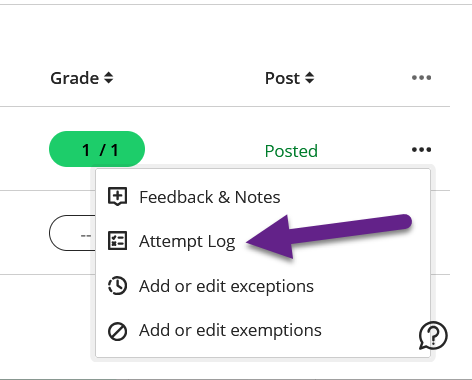
Now, select "Attempt Log" from the popup menu.
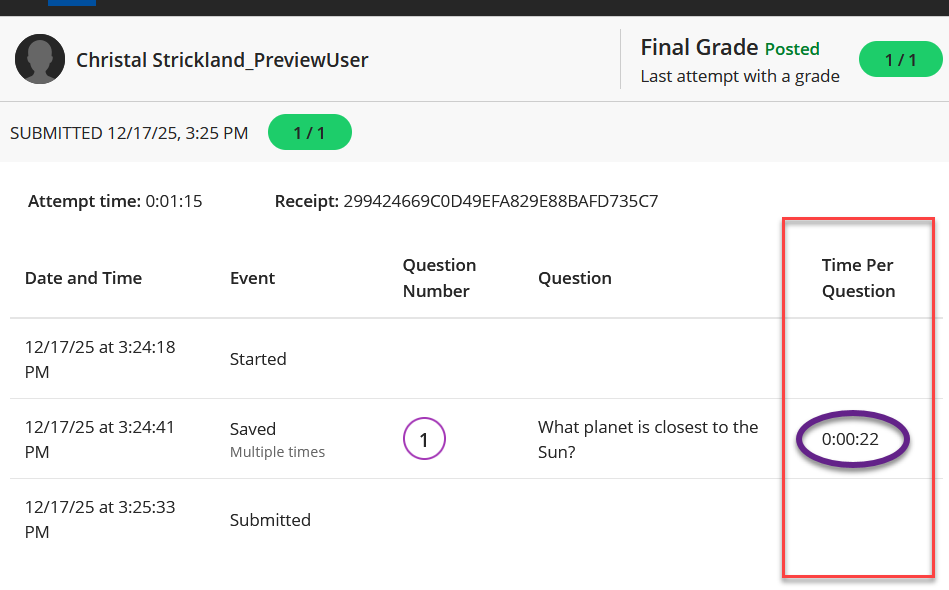
This will bring up the student's test attempt details. From this view, you may see how much time the student spent on a question in the "Time Per Question" column on the right.
Was this article helpful?
That’s Great!
Thank you for your feedback
Sorry! We couldn't be helpful
Thank you for your feedback
Feedback sent
We appreciate your effort and will try to fix the article