Automatic zeros at TCC are enabled by default. Any assignment not submitted before the deadline will receive a zero. If allowed by your course policy, students can still submit late work to update their grade.
However, if you discover that automatic zeros aren't working. Here's how to fix that:
- Go to the Gradebook.

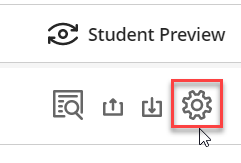
- Click on the Settings icon.
- Deselect the option Assign automatic zeros for past due work and select the option to Clear existing automatic zeros.
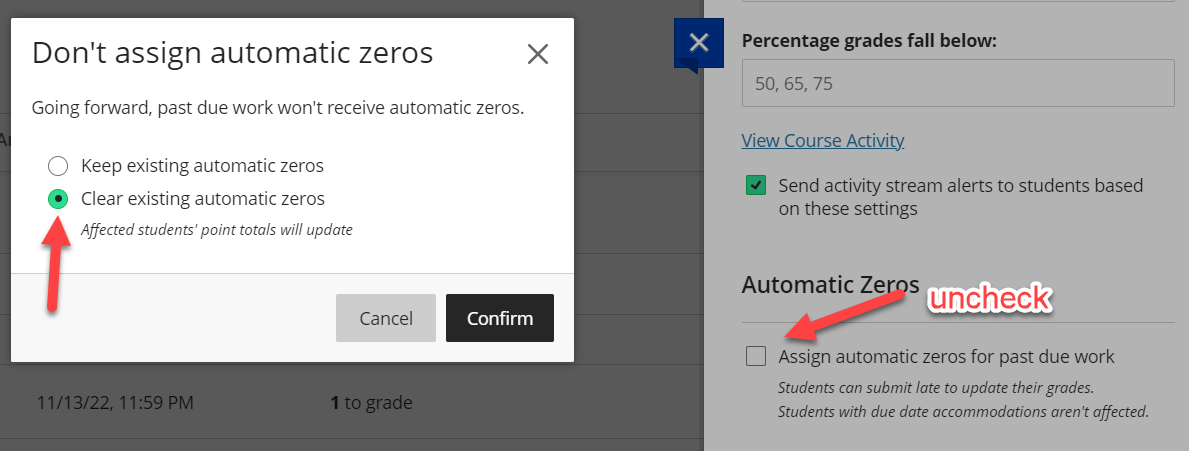
- Click Confirm.
- Select the option to Assign automatic zeros for past due work. In the Enable Automatic Zeros? pop up, click the Assign Zeros button.
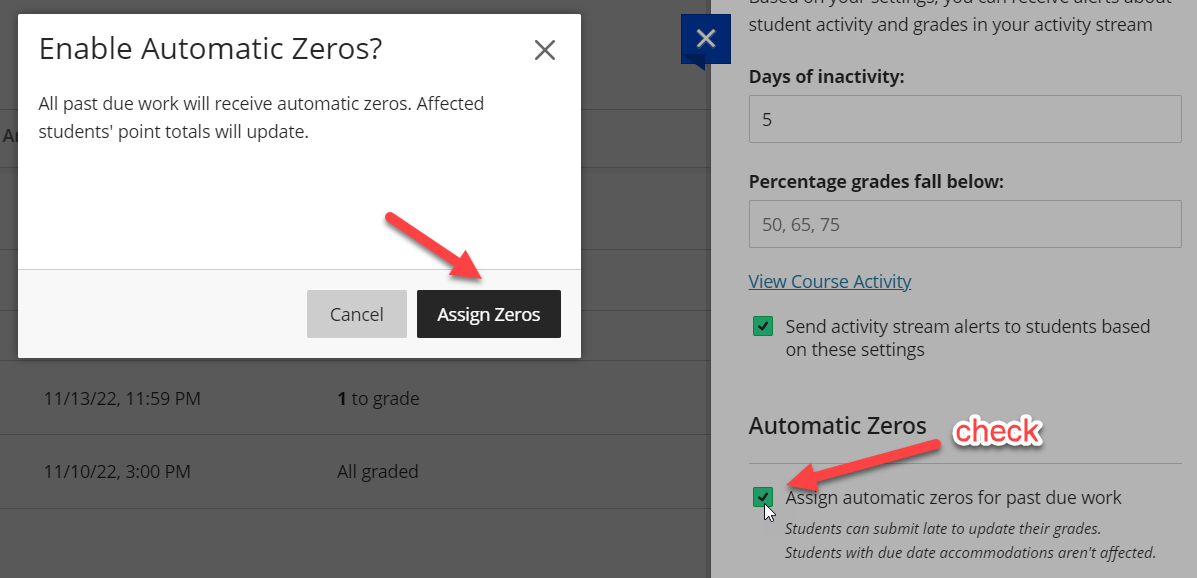
- Automatic Zeros should now be working.
You can read more by visiting our article over managing late submissions and Blackboard's support page on gradebook settings.
Was this article helpful?
That’s Great!
Thank you for your feedback
Sorry! We couldn't be helpful
Thank you for your feedback
Feedback sent
We appreciate your effort and will try to fix the article